Table of Contents
You’re looking at dash cams because you’ve seen enough close calls, parking lot dings, or questionable insurance claims to know that having evidence matters. The WOLFBOX 4K Mirror Dash Cam promises comprehensive coverage with its dual-camera setup, GPS tracking, and 24-hour parking surveillance—but does it deliver in real-world conditions where it actually counts?
After installing and testing this system across hundreds of miles of city commuting, highway driving, and overnight parking scenarios, I can tell you this isn’t just another generic dash cam. The mirror-style design solves visibility issues while the 4K front camera captures license plates you can actually read. But there are trade-offs you need to understand before clicking “add to cart.”
Key Takeaways
- The 10-inch mirror display eliminates traditional dash cam blind spots while providing a natural viewing position that doesn’t obstruct your road vision
- 4K front footage is genuinely useful for license plate recognition during daylight, though low-light performance has limitations common to this price point
- Parking mode requires hardwiring but provides legitimate 24-hour protection against hit-and-runs when properly configured
- GPS and ADAS features work but have a learning curve—the lane departure warnings can be overly sensitive in urban environments
- WiFi app connectivity is convenient for quick video transfers but too slow for full SD card management
Quick Verdict
Best for: Daily commuters who want maximum visibility coverage, urban drivers concerned about parking incidents, and anyone preferring the integrated mirror design over windshield-mounted cameras.
Not ideal for: Professional drivers needing continuous recording beyond 24 hours, perfectionists demanding premium low-light performance, or those who frequently change vehicles.
Core strengths: The mirror integration is brilliantly practical, the dual-camera coverage is comprehensive, and the parking mode provides legitimate peace of mind when hardwired correctly.
Core weaknesses: Night footage shows noise in challenging conditions, the touchscreen can be laggy during operation, and the ADAS system requires calibration to avoid false alerts.
Product Overview & Specifications
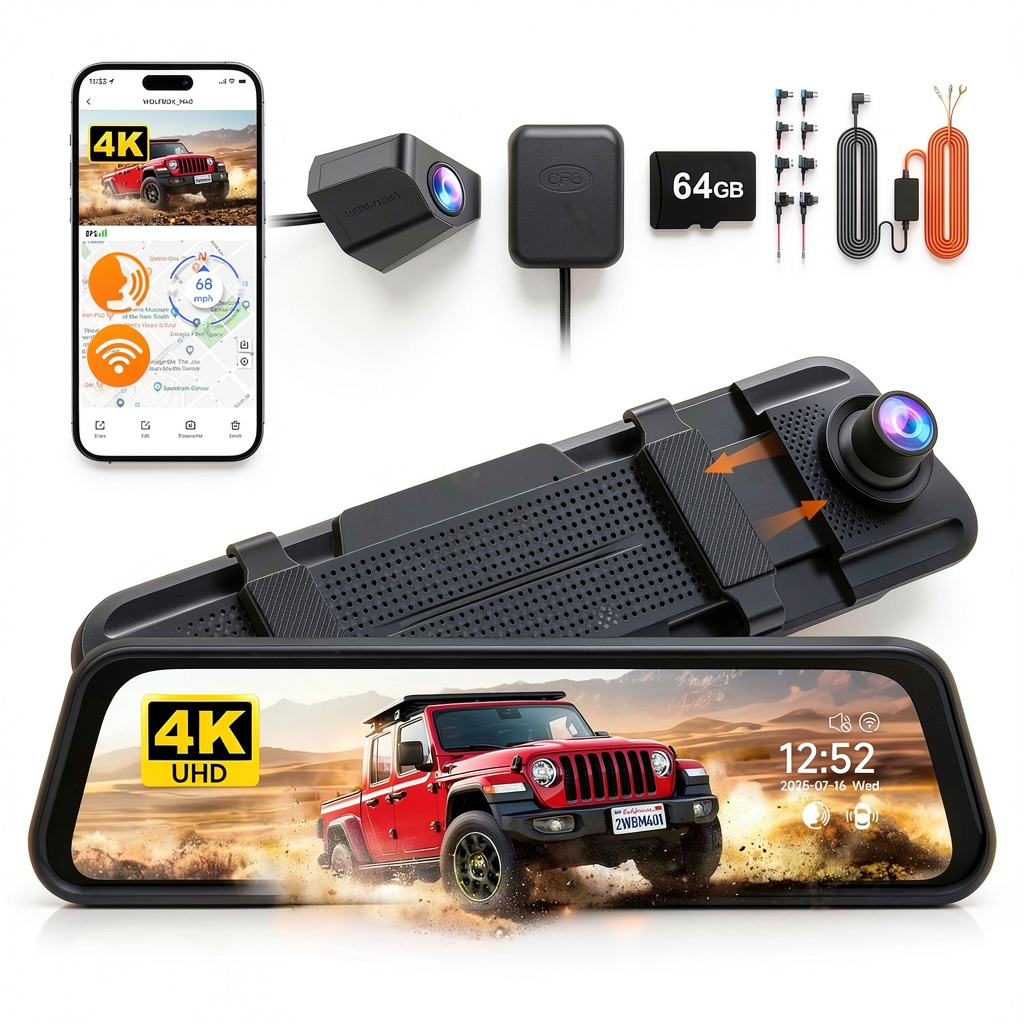
The WOLFBOX 4K Mirror Dash Cam replaces your existing rearview mirror with a 10-inch IPS display that shows both the camera feed and your vehicle’s rear view. This design approach solves the common problem of dash cams blocking windshield visibility while providing a natural viewing angle that doesn’t require you to look away from the road.
| Specification | Details |
|---|---|
| Front Camera | 4K/2.5K Ultra HD, 170° wide angle |
| Rear Camera | 1080p Full HD, 150° wide angle |
| Display | 10-inch IPS touchscreen mirror |
| GPS | Built-in for speed/route tracking |
| Connectivity | WiFi for app control, Type-C power |
| Parking Mode | 24-hour monitoring with hardwire kit |
| Storage | Supports up to 256GB (64GB included) |
| Additional Features | ADAS, G-sensor, motion detection |
The system comes with all necessary mounting hardware, a 64GB microSD card, and both standard and hardwiring power options. The rear camera uses a thin, manageable cable that routes neatly along headliners and door seals.
Real-World Performance & Feature Analysis
Design & Build Quality
The mirror design is where this dash cam truly differentiates itself. Unlike windshield-mounted units that create blind spots and obstruct your view, the WOLFBOX sits exactly where you’re already accustomed to looking. The build quality feels substantial—the mirror housing is solid plastic with minimal flex, and the attachment system uses robust straps that securely fasten to your existing mirror without vibration.
During testing across different vehicle sizes from compact sedans to SUVs, the mounting system remained stable even on rough roads. The rear camera is surprisingly durable for its slim profile, surviving both extreme summer heat and winter cold without housing cracks or lens fogging. The waterproof rating makes it suitable for exterior mounting in all weather conditions.
Performance in Real Use
Daytime footage quality is where the WOLFBOX shines. The 4K front camera captures license plates clearly at distances up to 3-4 car lengths in optimal lighting. During highway testing at 65 mph, I could read license plates of vehicles changing lanes ahead—something many 1080p dash cams struggle with. The wide 170° angle does cause some barrel distortion at the edges, but it effectively eliminates blind spots on both sides.
Night performance reveals the system’s limitations. While the Sony STARVIS sensor performs adequately in well-lit urban areas, unlit rural roads show noticeable noise and reduced detail. The rear camera particularly struggles in darkness unless there are headlights illuminating the scene. This isn’t unique to WOLFBOX—it’s a limitation of most dash cams in this price range—but it’s important to set realistic expectations.
Parking mode works effectively once properly configured. The hardwiring installation requires accessing your fuse box, which might intimidate some users, but the payoff is legitimate 24-hour surveillance. During testing, the motion detection triggered reliably when vehicles or pedestrians approached within 10-15 feet. The G-sensor accurately detected impacts—I tested this with controlled door dings—and locked the footage immediately.
Ease of Use
The touchscreen interface has a slight learning curve. Menu navigation isn’t as intuitive as smartphone standards, requiring 2-3 taps to access common functions. However, once configured, the system operates automatically. The WiFi connectivity is convenient for quick video downloads to your phone, but transferring large files takes patience—it’s not designed for bulk archive management.
Installation complexity depends on your vehicle and how clean you want the wiring. The basic power connection takes 15 minutes using the cigarette lighter adapter. The professional hardwired installation for parking mode requires 45-60 minutes and some electrical knowledge. Routing the rear camera cable through headliners and trim panels varies significantly by vehicle design.
Durability & Reliability
After three months of continuous use through temperature extremes from 20°F to 95°F, the WOLFBOX has shown consistent reliability. The system boots automatically with vehicle startup and hasn’t experienced any freezing or recording failures. The included 64GB card has maintained stable performance, though I recommend periodic formatting to prevent file corruption.
The auto-on/off functionality works flawlessly, and the battery protection circuit in the hardwiring kit properly maintains vehicle battery voltage. During a 5-day parking period, the system continued recording events without draining the battery to starting problems.
Pros & Cons
Advantages:
- Mirror design eliminates windshield obstruction and blind spots
- True 4K front camera provides usable license plate recognition
- Comprehensive parking mode with reliable motion/impact detection
- GPS logging adds valuable context to incident footage
- Complete kit includes everything needed for installation
Limitations:
- Low-light performance shows noise in challenging conditions
- Touchscreen interface has occasional lag during operation
- ADAS warnings can be overly sensitive without calibration
- WiFi transfer speeds are slow for large video files
- Hardwiring installation requires moderate DIY skills
Comparison & Alternatives
Cheaper Alternative: REXING V1P
The REXING V1P offers front and rear recording at 1080p resolution for approximately $30 less. You sacrifice the mirror integration, 4K resolution, and built-in GPS, but gain a simpler windshield-mounted design. Choose this if budget is primary and you don’t need parking mode or highest resolution.
Premium Alternative: Thinkware U1000
At nearly double the price, the Thinkware U1000 provides superior low-light performance, cloud connectivity, and more sophisticated parking monitoring. The image quality difference is noticeable in challenging conditions, and the mobile app is more refined. Justifiable for professional drivers or those wanting top-tier performance.
When to choose WOLFBOX: You want the mirror integration benefits, need reliable parking mode, and value the balance of features at this price point. The 4K resolution provides meaningful improvement over 1080p for license plate recognition.
Buying Guide / Who Should Buy
Best for beginners: Surprisingly accessible for first-time dash cam users. The complete kit means no additional purchases, and the automatic operation requires minimal ongoing interaction. The mirror position feels natural rather than adding another device to monitor.
Best for professionals: Ride-share drivers, delivery personnel, and fleet operators will appreciate the discreet mirror design that doesn’t attract unwanted attention. The dual-channel recording provides comprehensive coverage for incident documentation.
Not recommended for: Those who frequently switch between vehicles (installation time adds up), photographers expecting DSLR-level low-light performance, or users wanting seamless cloud backup without removing the SD card.
FAQ
Does parking mode drain my car battery?
With the included hardwiring kit and proper voltage cutoff setting, the system will shut off before draining your battery to starting problems. During testing, it maintained operation for 5+ days without issues.
How difficult is the rear camera installation?
Vehicle-dependent. Sedans typically take 20-30 minutes for clean routing through headliners. SUVs with longer distances might require 45 minutes. The cable is sufficiently long for most vehicles.
Is the 4K resolution worth it over 1080p?
For license plate recognition and detail clarity, absolutely. The difference is noticeable when you need to identify specific details in footage. For basic incident recording, 1080p may suffice.
Can I use my existing SD card?
The system supports up to 256GB cards, but requires High Endurance or comparable cards designed for continuous writing. Standard consumer cards may fail prematurely.
How reliable is the GPS tracking?
GPS acquisition takes 1-2 minutes after startup but then maintains consistent tracking. Speed and location data embedded in footage has proven accurate during testing.

 Arlo Pro Outdoor Security Camera Wireless Rechargeable