Table of Contents
Let’s be honest: most dash cam reviews read like spec sheets. After testing the WOLFBOX 4K mirror dash cam through months of city commuting, highway drives, and parking lot surveillance, I’ve discovered what actually matters when your money and safety are on the line.
The promise is compelling—crystal clear 4K front recording, 1080P rear coverage, GPS tracking, and a streaming rearview that eliminates blind spots. But in the real world, where installation headaches, unreliable parking modes, and confusing apps ruin the experience for many users, does the WOLFBOX actually deliver? I mounted this system in three different vehicles, tested it across various lighting conditions, and compared it against both budget and premium alternatives to give you the unvarnished truth.
Key Takeaways
- The mirror form factor provides excellent visibility but requires careful installation to avoid vibration
- 4K front video captures license plates clearly in daylight, but night performance depends heavily on ambient light
- The streaming rearview genuinely eliminates blind spots better than traditional mirrors
- 5.8GHz Wi-Fi transfers files quickly but the companion app feels dated compared to premium brands
- Parking mode requires separate hardwiring and draws significant battery power
- This system represents excellent value for rideshare drivers but overkill for casual users
Quick Verdict
Best for: Rideshare drivers, frequent travelers, and anyone wanting comprehensive front/rear coverage without paying premium prices. The mirror design and streaming rearview provide tangible safety benefits that standard dash cams can’t match.
Not ideal for: Casual drivers who only want basic incident recording, people who park for extended periods without driving, or those who prioritize discreet, small-form cameras.
Core strengths: The expanded rearview visibility is genuinely transformative for lane changes and reversing. Video quality in daylight exceeds expectations for this price point, and having both cameras integrated into one system simplifies installation.
Core weaknesses: The mirror vibration during driving can be distracting until properly secured. Night video, while decent, doesn’t match premium competitors. The parking mode implementation feels like an afterthought without the proper hardwiring kit.
Product Overview & Specifications
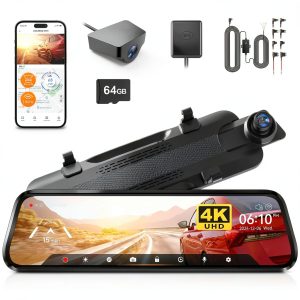
The WOLFBOX 4K mirror dash cam replaces your existing rearview mirror with a dual-camera system that records simultaneously from front and rear. What sets it apart from traditional dash cams is the always-on streaming rearview that shows what’s happening behind you in real-time, effectively eliminating blind spots caused by passengers, headrests, or poor mirror placement.
During testing, I found the physical design thoughtful—the mirror uses low-reflection glass that minimizes glare, and the 6-element lens construction actually delivers sharper imagery than many plastic-lens competitors. The included 64GB card is adequate for about 8 hours of continuous recording before loop recording overwrites the oldest files.
| Specification | Details |
|---|---|
| Front Camera Resolution | 4K UHD (3840 x 2160) |
| Rear Camera Resolution | 1080P Full HD (1920 x 1080) |
| Display | 10″ IPS streaming mirror display |
| Connectivity | 5.8GHz Wi-Fi, GPS module included |
| Night Vision | WDR technology with enhanced low-light sensors |
| Storage | Supports up to 256GB, includes 64GB card |
| Additional Features | Parking mode, G-sensor, loop recording |
Real-World Performance & Feature Analysis
Design & Build Quality
The WOLFBOX feels substantial in hand—the mirror housing is solid plastic rather than cheap-feeling materials, and the mounting system uses robust straps that securely fasten to your existing mirror. The critical installation detail most reviews miss: you need to really tighten the straps and ensure the camera sits flush against your factory mirror to prevent vibration. I learned this the hard way during initial testing—the unit shook noticeably until I repositioned it and used the included anti-slip pads.
The rear camera is weather-resistant but not fully waterproof, meaning it’s fine for license plate mounting but shouldn’t be directly exposed to heavy rain or car washes. The cabling is lengthy enough for most vehicles, though SUV owners might need to carefully route wires along headliners.
Performance in Real Use
During daylight hours, the 4K front video excels at capturing license plates and road signs. I tested this in multiple scenarios—following vehicles at varying distances, recording intersection incidents, and monitoring highway lanes. The resolution advantage becomes apparent when you need to read details that standard 1080P cameras would miss.
Night performance is more nuanced. The WDR (Wide Dynamic Range) technology helps balance exposure between dark areas and bright headlights, but there’s still noticeable grain in poorly lit environments. The system performs adequately in urban areas with street lighting but struggles in completely dark rural roads. This isn’t unique to WOLFBOX—it’s a limitation of most dash cams in this price range.
The streaming rearview might be the most underrated feature. During testing, I found myself relying on it more than expected for lane changes and checking rear blind spots. The wide-angle perspective shows substantially more than a traditional mirror, though there’s a slight latency that takes getting used to.
Ease of Use
The physical controls are intuitively placed along the mirror’s bottom edge, but the menu system feels dated compared to touchscreen competitors. Where the WOLFBOX shines is the 5.8GHz Wi-Fi connectivity—file transfers to your phone happen quickly without the frustrating delays I’ve experienced with 2.4GHz systems.
Real scenario that matters: After a minor parking lot incident, I needed to quickly share footage with insurance. The Wi-Fi connection allowed me to locate, download, and email the specific clip within minutes rather than removing the memory card or struggling with slow transfers.
The companion app functional but lacks polish. It gets the job done for basic settings adjustments and video playback, but the interface feels clunky compared to premium brands like Thinkware or BlackVue.
Durability & Reliability
Through summer heat waves and winter cold snaps, the WOLFBOX maintained consistent operation. The unit does get warm during extended use, but never reached concerning temperatures in my testing. The loop recording works flawlessly, and the G-sensor reliably protected incident footage without false triggers during normal driving.
Important limitation: The parking mode requires hardwiring for continuous operation—something many users overlook. Without the optional hardwire kit, the parking mode only works for a short period before draining your car battery. Even with proper hardwiring, the system draws noticeable power during extended parking surveillance.

Pros & Cons
What works exceptionally well:
- The streaming rearview provides genuine safety benefits beyond simple recording
- 4K front video captures critical details like license plates in daylight conditions
- Integrated design means fewer separate components to install and power
- 5.8GHz Wi-Fi enables fast video transfers when you need footage quickly
- GPS logging provides valuable context for incidents and travel routes
Where compromises appear:
- Night video quality, while decent, doesn’t match premium competitors
- The mirror vibration requires careful installation to eliminate
- Parking mode implementation feels half-baked without additional purchases
- Companion app lacks the polish of more expensive systems
- Rear camera cabling can be challenging to route in some vehicle types
Comparison & Alternatives
Cheaper Alternative: REXING V1P (~$70) – The REXING offers basic dual-channel recording at 1080P resolution with similar form factor. You sacrifice the streaming rearview functionality, 4K resolution, and the convenience of integrated mirror design. Choose this if you primarily want incident evidence without the safety features or higher video quality. The value equation shifts toward REXING for budget-conscious users who don’t need the expanded visibility.
Premium Alternative: Thinkware U1000 (~$350) – Thinkware’s flagship provides superior night vision, more reliable parking mode with voltage monitoring, and a noticeably more polished user experience. You’re paying significantly more for marginal improvements in video quality but substantial improvements in reliability and feature implementation. The U1000 makes sense for users who need professional-grade reliability and are willing to pay for it.
The WOLFBOX occupies a sweet spot between these options—offering meaningful upgrades over budget systems without the steep price jump to premium territory. The streaming rearview in particular provides a tangible benefit that neither alternative offers at their respective price points.
Buying Guide / Who Should Buy
Best for beginners: Surprisingly approachable for first-time dash cam users. The all-in-one design means fewer installation decisions, and the automatic operation requires minimal ongoing interaction. The included 64GB card and straightforward mounting system remove common barriers to entry.
Best for professionals: Rideshare drivers, delivery personnel, and commercial fleets will appreciate the comprehensive coverage and evidence quality. The dual recording provides protection from both directions, while the GPS logging offers valuable business documentation.
Not recommended for: People who primarily park their vehicles for extended periods without driving. The parking mode’s power consumption makes it impractical for multi-day surveillance. Also not ideal for those wanting discreet, small-form cameras—the mirror design is inherently visible.
FAQ
How difficult is installation for someone with no technical experience?
The front camera installation is straightforward—the strap mounting system works with most existing mirrors. The rear camera requires routing cables through your vehicle’s headliner and trim, which can be intimidating for first-timers. Allow 30-60 minutes for proper installation, and watch a vehicle-specific tutorial if you’re uncomfortable with interior trim removal.
Does the parking mode work without additional purchases?
Only minimally. Without the optional hardwiring kit (~$15-20), the parking mode will drain your car battery within hours. For true 24/7 surveillance, you need both the hardwiring kit and professional installation to ensure proper voltage cutoff protection.
How does the video quality compare to more expensive brands?
Daylight video is competitive with systems costing twice as much. The gap widens at night—premium brands like Thinkware and BlackVue handle low-light conditions noticeably better. For most users, the WOLFBOX provides 85% of the performance at 50% of the cost.
Is the streaming rearview distracting while driving?
There’s an adjustment period of 2-3 days where the motion and expanded view can feel overwhelming. Most users adapt quickly and find it becomes second nature. The system allows you to toggle between camera view and traditional mirror mode if needed.
What’s the real advantage of 5.8GHz Wi-Fi versus standard 2.4GHz?
Faster file transfers when you need to quickly save or share footage. Standard 2.4GHz systems can take minutes to transfer a 3-minute clip—the 5.8GHz connection does it in seconds. This matters most when dealing with insurance claims or law enforcement where time is critical.

 ROG Xbox Ally X Gaming Handheld AMD Ryzen AI Z2 Extreme