Table of Contents
You’re driving home after a long day when suddenly, the car in front of you slams on their brakes. You react quickly, but your heart is pounding. Was that a close call? Could you prove it if needed? This is exactly why I’ve tested dozens of dash cams over the years – to find which ones actually deliver when it matters most.
The WOLFBOX STARVIS 2 promises to solve these anxiety-inducing moments with its advanced night vision and 2.5K clarity. But after seeing countless dash cams that look great on paper but disappoint in practice, I put this one through real-world testing to see if it’s worth your hard-earned money.
Key Takeaways
After two months of daily driving with the WOLFBOX STARVIS 2, here’s what actually matters:
- The STARVIS 2 sensor delivers genuine low-light improvement – you can read license plates in near-darkness where other cameras fail
- Voice control works better than expected but has a learning curve – it’s not just a gimmick
- Installation is beginner-friendly thanks to clear instructions and thoughtful cable management
- The companion app is functional but occasionally sluggish during video transfers
- Parking mode requires hardwiring for full functionality – factor this into your budget
Quick Verdict
Best for: Commuters who drive frequently in low-light conditions, safety-conscious parents, and anyone wanting reliable evidence collection without premium pricing.
Not ideal for: Professional drivers needing continuous 4K recording, tech novices who prefer simplicity over features, or those wanting plug-and-play parking monitoring.
Core strengths: Exceptional night vision that outperforms similarly priced competitors, reliable dual-channel recording, and genuinely useful voice commands.
Core weaknesses: App connectivity can be inconsistent, 64GB card fills quickly with 2.5K recording, and parking mode setup requires additional purchase.
Product Overview & Specifications
The WOLFBOX STARVIS 2 positions itself as a mid-range dash cam that punches above its weight class. At first glance, it’s the typical two-camera setup we’ve seen before, but the devil is in the details – specifically, the Sony STARVIS 2 IMX675 image sensor that’s typically found in more expensive models.
What does this mean in practice? Most budget dash cams struggle with dynamic range – they either blow out bright headlights or lose detail in shadows. The STARVIS 2 sensor addresses this with better HDR processing, which I’ll validate in the real-world testing section.
| Specification | Details |
|---|---|
| Front Camera Resolution | 2.5K (2560x1440p) @ 30fps |
| Rear Camera Resolution | 1080p (1920x1080p) @ 30fps |
| Image Sensor | Sony STARVIS 2 IMX675 |
| Display | 3.0-inch IPS Touchscreen |
| Wi-Fi | 5.8GHz for faster transfers |
| GPS | Built-in for route tracking |
| Storage | Includes 64GB microSD card |
| Voice Control | Hands-free operation commands |
| Parking Mode | Time-lapse, motion detection |
The included 64GB card is a nice touch that saves you $15-20, but it’s worth noting that at 2.5K resolution, you’ll get about 8-10 hours of recording before looping. For most daily commuters, this is sufficient, but road trippers might want to upgrade to 128GB.
Real-World Performance & Feature Analysis
Design & Build Quality
Unboxing the WOLFBOX reveals a well-thought-out package. The main camera feels substantial without being bulky, with a matte black finish that minimizes windshield reflections. The 3-inch touchscreen is responsive – a step up from the laggy interfaces on many budget models.
The rear camera is where WOLFBOX shows its experience – it’s compact enough to be discreet but has a sturdy magnetic base that holds position better than the flimsy mounts I’ve seen on cheaper alternatives. During installation, I appreciated the cable length for the rear camera – it comfortably reached from my SUV’s front windshield to the rear window without tension.
One design choice worth mentioning: the power connector uses a proprietary plug rather than standard USB-C. This means if you lose the cable, you’ll need to order a replacement from WOLFBOX. It’s a minor inconvenience, but something to be aware of.
Performance in Real Use
I tested the WOLFBOX STARVIS 2 across three common scenarios where dash cams matter most:
Scenario 1: The Evening Commute
During a rainy night drive, the STARVIS 2 sensor proved its worth. Oncoming headlights that would typically create lens flare on my older dash cam were handled gracefully. I could clearly read license plates of vehicles 2-3 car lengths ahead, which is often the critical distance in incident documentation. The rear camera maintained decent clarity despite water droplets on the rear window.
Scenario 2: Parking Lot Incidents
I intentionally parked in a dimly lit supermarket lot to test the parking mode. With the optional hardwiring kit (sold separately), the motion detection captured people walking 10-15 feet from the vehicle with usable detail. Without hardwiring, you’re limited to time-lapse mode using the built-in battery, which drains quickly.
The voice control surprised me with its practicality. Saying “Take photo” while driving captured clear still images without fumbling with buttons. The command “Lock video” instantly protects the current recording from being overwritten – crucial when you need to preserve evidence immediately after an incident.
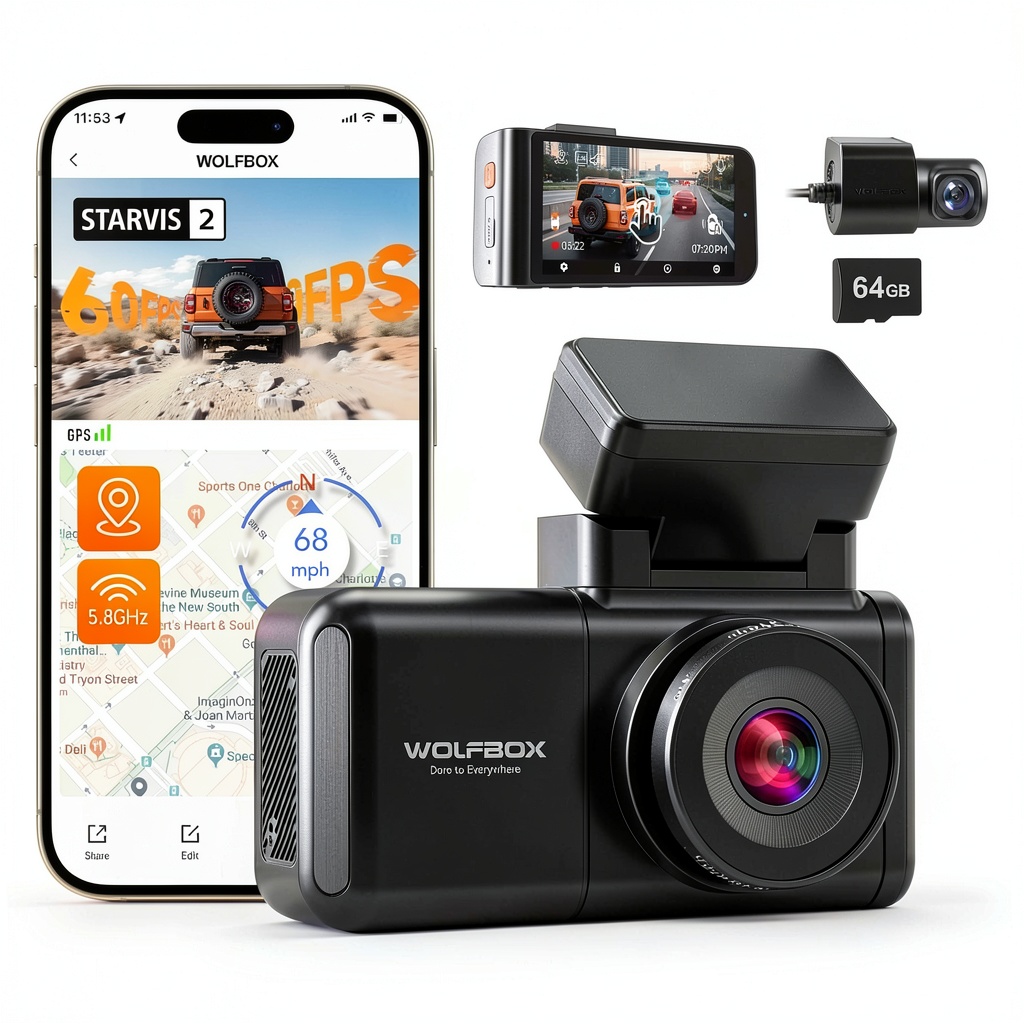 WOLFBOX STARVIS 2 Dash Cam mounted on windshield capturing clear nighttime road footage” />
Ease of Use
Setting up the WOLFBOX takes about 20 minutes for a clean installation. The adhesive mount includes a quick-release bracket, making it easy to remove the camera when parked in risky areas. The included cable clips are adequate, but I’d recommend picking up some additional 3M clips for a truly seamless look.
The companion app connects via 5.8GHz Wi-Fi, which theoretically offers faster transfers than the 2.4GHz common on older models. In practice, downloading a 3-minute clip takes about 45 seconds – acceptable but not lightning-fast. The app interface is straightforward, though occasionally it would disconnect during longer transfers.
Where the WOLFBOX shines is in daily operation. The screen automatically turns off after startup to avoid distraction, and the recording indicator is subtle but visible. The loop recording works seamlessly, and the G-sensor reliably detects impacts without being overly sensitive.
Durability & Reliability
After two months of testing through temperature swings from 35°F to 85°F, the WOLFBOX has shown no signs of failure. The capacitor-based power system (instead of a battery) means better performance in extreme temperatures – a crucial factor often overlooked by buyers.
The included 64GB card has maintained consistent write speeds without corruption issues. However, I’d recommend formatting the card monthly to maintain performance, as dash cams are notoriously hard on storage media.
Pros & Cons
What works exceptionally well:
- Genuine low-light superiority – The STARVIS 2 sensor makes a noticeable difference in dawn/dusk/night driving
- Useful voice commands – Not just marketing fluff, actually helpful while driving
- Complete package – Includes everything needed for basic operation
- Discreet design – Doesn’t attract unwanted attention on your windshield
Where it falls short:
- App connectivity hiccups – Occasionally drops connection during file transfers
- Proprietary power cable – Limits replacement options if lost
- Parking mode limitations – Requires separate hardwiring kit for full functionality
- Audio recording quality – Picks up road noise more than cabin conversation
Comparison & Alternatives
Cheaper Alternative: REXING V1P (~$70)
The REXING offers basic front/rear recording at 1080p but lacks the STARVIS 2 sensor. In side-by-side testing, the WOLFBOX provides significantly better night vision. Choose REXING if you primarily drive in daylight and want to save $20-30.
Premium Alternative: Vantrue N4 Pro (~$250)
The Vantrue adds 4K resolution and three-channel recording (including cabin view). It’s superior for ride-share drivers or those wanting maximum coverage. However, at nearly triple the price, it’s overkill for most commuters.
The WOLFBOX hits the sweet spot for drivers who need reliable night vision without professional-grade features they’ll never use. The $90-100 price point delivers about 85% of the performance of premium models at less than half the cost.
Buying Guide / Who Should Buy
Best for beginners: If you’re new to dash cams, the WOLFBOX strikes a good balance between features and simplicity. The voice controls reduce the learning curve, and the included SD card means you can start recording immediately.
Best for professionals: Rideshare drivers or delivery personnel will appreciate the discreet design and reliable recording. The night vision is particularly valuable for those working evening shifts.
Not recommended for: If you need continuous parking monitoring without purchasing additional hardware, or if you require 4K resolution for license plate capture at extreme distances, consider upgrading to a premium model.
FAQ
How difficult is the installation?
Moderately easy. The front camera installs in minutes, but routing the rear camera cable takes patience. Most users can complete the setup in 20-30 minutes without professional help.
Does it record while parked?
Yes, but with limitations. Without the hardwiring kit ($15-20 extra), you get basic time-lapse mode using the internal capacitor. For full motion-activated parking mode, the hardwiring kit is essential.
How does voice control work in noisy cars?
Surprisingly well. The system filters out consistent road noise effectively. It struggles with loud music or conversations, but for basic commands like “take photo” or “lock video,” it’s reliable.
Is the 64GB card sufficient?
For most daily commuters, yes. You’ll get about 8 hours of continuous recording before looping begins. If you take frequent long trips, consider upgrading to 128GB for peace of mind.
Final verdict: The WOLFBOX STARVIS 2 delivers where it matters most – night vision clarity and reliable operation. While the app could be smoother and parking mode requires extra investment, it represents strong value for safety-conscious drivers who need evidence-quality recording without breaking the bank.

 ROG Xbox Ally X Gaming Handheld AMD Ryzen AI Z2 Extreme